
How I Built a Gemini Chatbot Clone Using HTML, CSS, JS & Google’s Gemini API
Everyone’s been talking about AI, and let’s be honest—Gemini by Google is one of the most exciting tools out there right now.
So I thought:
“What if I create a sleek, responsive chatbot clone—something that looks and feels like Gemini—and actually uses the Gemini API under the hood?”
And that’s exactly what I did.
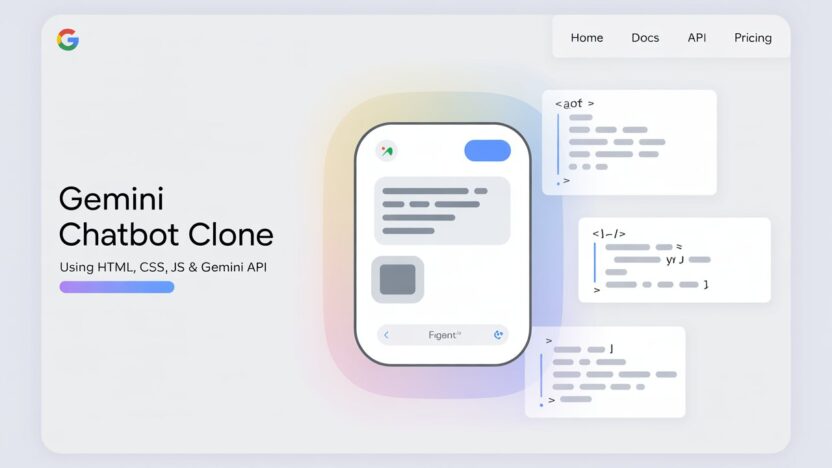
In this post, I’ll walk you through how I built a Gemini Chatbot clone using just HTML, CSS, and JavaScript, and how I integrated it with Google’s Gemini API to give it real AI capabilities.
Why I Built It
I’ve always liked clean UI projects. But I didn’t just want a static chatbot simulation—I wanted it to actually talk like Gemini.
This project started as a fun UI clone, but then I figured: why stop there? Let’s plug in the real API and make it respond intelligently.
The goal was simple:
Frontend-only stack: HTML, CSS, JS.
No bloated frameworks.
Real Gemini API responses.
Sleek, mobile-friendly interface.
What I Used
HTML – For basic structure.
CSS – For styling the chat layout, message bubbles, and animations.
JavaScript – For chat logic and API calls.
Gemini API – To power real-time responses with natural language.
That’s it—no React, no server framework. Just clean code and Google’s AI doing the heavy lifting.
How It Works (Explanation)
Here’s the breakdown of the whole flow:
1. The Frontend UI
The interface looks and feels like Gemini:
A chat window with scrolling messages.
Typing box at the bottom.
Message bubbles styled cleanly for user and bot.
All built with flexbox, minimal animations, and mobile responsiveness.
2. Sending a Message
When the user types and hits “Enter” :
The message is added to the chat log.
A “Amazing Skeleton loading” animation appears briefly.
3. Calling the Gemini API
After the typing animation:
A POST request is sent to the Gemini API endpoint using
fetch.The message is included as a prompt.
The API returns a response, which is added as the bot’s message.
If you’re using Gemini Pro or any variant, make sure to set your API key securely and follow rate limits.
Now, let’s look at the source code. I’ve provided it so you can easily copy and run it.
HTML Code:
					<!DOCTYPE html>
<!-- Coded By Ahetsham from HostFlare - www.hostflare.in -->
<html lang="en">
<head>
  <meta charset="UTF-8">
  <meta name="viewport" content="width=device-width, initial-scale=1.0">
  <title>Gemini Chatbot | By Ahetesham From HostFlare </title>
  <!-- Linking Google Fonts For Icons -->
  <link rel="stylesheet" href="https://fonts.googleapis.com/css2?family=Material+Symbols+Rounded:opsz,wght,FILL,GRAD@24,400,0,0" />
  <link rel="stylesheet" href="style.css">
</head>
<body>
  <header class="header">
    <!-- Header Greetings -->
    <h1 class="title">Hello, there</h1>
    <p class="subtitle">How can I help you today?</p>

    <!-- Suggestion list -->
    <ul class="suggestion-list">
      <li class="suggestion">
        <h4 class="text">Help me plan a game night with my 5 best friends for under $100.</h4>
        <span class="icon material-symbols-rounded">draw</span>
      </li>
      <li class="suggestion">
        <h4 class="text">What are the best tips to improve my public speaking skills?</h4>
        <span class="icon material-symbols-rounded">lightbulb</span>
      </li>
      <li class="suggestion">
        <h4 class="text">Can you help me find the latest news on web development?</h4>
        <span class="icon material-symbols-rounded">explore</span>
      </li>
      <li class="suggestion">
        <h4 class="text">Write JavaScript code to sum all elements in an array.</h4>
        <span class="icon material-symbols-rounded">code</span>
      </li>
    </ul>
  </header>

  <!-- Chat List / Container -->
  <div class="chat-list"></div>

  <!-- Typing Area -->
  <div class="typing-area">
    <form action="#" class="typing-form">
      <div class="input-wrapper">
        <input type="text" placeholder="Enter a prompt here" class="typing-input" required />
        <button id="send-message-button" class="icon material-symbols-rounded">send</button>
      </div>
      <div class="action-buttons">
        <span id="theme-toggle-button" class="icon material-symbols-rounded">light_mode</span>
        <span id="delete-chat-button" class="icon material-symbols-rounded">delete</span>
      </div>
    </form>
    <p class="disclaimer-text">
      Gemini may display inaccurate info, including about people, so double-check its responses.
    </p>
  </div>

  <script src="script.js"></script>
</body>
</html>
CSS Code:
					/* Import Google Font - Poppins */
@import url('https://fonts.googleapis.com/css2?family=Poppins:wght@400;500;600&display=swap');

* {
  margin: 0;
  padding: 0;
  box-sizing: border-box;
  font-family: "Poppins", sans-serif;
}

:root {
  /* Dark mode colors */
  --text-color: #E3E3E3;
  --subheading-color: #828282;
  --placeholder-color: #A6A6A6;
  --primary-color: #242424;
  --secondary-color: #383838;
  --secondary-hover-color: #444;
}

.light_mode {
  /* Light mode colors */
  --text-color: #222;
  --subheading-color: #A0A0A0;
  --placeholder-color: #6C6C6C;
  --primary-color: #FFF;
  --secondary-color: #E9EEF6;
  --secondary-hover-color: #DBE1EA;
}

body {
  background: var(--primary-color);
}

.header, .chat-list .message, .typing-form {
  margin: 0 auto;
  max-width: 980px;
}

.header {
  margin-top: 6vh;
  padding: 1rem;
  overflow-x: hidden;
}

body.hide-header .header {
  margin: 0;
  display: none;
}

.header :where(.title, .subtitle) {
  color: var(--text-color);
  font-weight: 500;
  line-height: 4rem;
}

.header .title {
  width: fit-content;
  font-size: 3rem;
  background-clip: text;
  background: linear-gradient(to right, #4285f4, #d96570);
  -webkit-background-clip: text;
  -webkit-text-fill-color: transparent;
}

.header .subtitle {
  font-size: 2.6rem;
  color: var(--subheading-color);
}

.suggestion-list {
  width: 100%;
  list-style: none;
  display: flex;
  gap: 1.25rem;
  margin-top: 9.5vh;
  overflow: hidden;
  overflow-x: auto;
  scroll-snap-type: x mandatory;
  scrollbar-width: none;
}

.suggestion-list .suggestion {
  cursor: pointer;
  padding: 1.25rem;
  width: 222px;
  flex-shrink: 0;
  display: flex;
  flex-direction: column;
  align-items: flex-end;
  border-radius: 0.75rem;
  justify-content: space-between;
  background: var(--secondary-color);
  transition: 0.2s ease;
}

.suggestion-list .suggestion:hover {
  background: var(--secondary-hover-color);
}

.suggestion-list .suggestion :where(.text, .icon) {
  font-weight: 400;
  color: var(--text-color);
}

.suggestion-list .suggestion .icon {
  width: 42px;
  height: 42px;
  display: flex;
  font-size: 1.3rem;
  margin-top: 2.5rem;
  align-self: flex-end;
  align-items: center;
  border-radius: 50%;
  justify-content: center;
  color: var(--text-color);
  background: var(--primary-color);
}

.chat-list {
  padding: 2rem 1rem 12rem;
  max-height: 100vh;
  overflow-y: auto;
  scrollbar-color: #999 transparent;
}

.chat-list .message.incoming {
  margin-top: 1.5rem;
}

.chat-list .message .message-content {
  display: flex;
  gap: 1.5rem;
  width: 100%;
  align-items: center;
}

.chat-list .message .text {
  color: var(--text-color);
  white-space: pre-wrap;
}

.chat-list .message.error .text {
  color: #e55865;
}

.chat-list .message.loading .text {
  display: none;
}

.chat-list .message .avatar {
  width: 40px;
  height: 40px;
  object-fit: cover;
  border-radius: 50%;
  align-self: flex-start;
}

.chat-list .message.loading .avatar {
  animation: rotate 3s linear infinite;
}

@keyframes rotate {
  100% {
    transform: rotate(360deg);
  }
}

.chat-list .message .icon {
  color: var(--text-color);
  cursor: pointer;
  height: 35px;
  width: 35px;
  border-radius: 50%;
  display: flex;
  align-items: center;
  justify-content: center;
  background: none;
  font-size: 1.25rem;
  margin-left: 3.5rem;
  visibility: hidden;
}

.chat-list .message .icon.hide {
  visibility: hidden;
}

.chat-list .message:not(.loading, .error):hover .icon:not(.hide){
  visibility: visible;
}

.chat-list .message .icon:hover {
  background: var(--secondary-hover-color);
}

.chat-list .message .loading-indicator {
  display: none;
  gap: 0.8rem;
  width: 100%;
  flex-direction: column;
}

.chat-list .message.loading .loading-indicator {
  display: flex;
}

.chat-list .message .loading-indicator .loading-bar {
  height: 11px;
  width: 100%;
  border-radius: 0.135rem;
  background-position: -800px 0;
  background: linear-gradient(to right, #4285f4, var(--primary-color), #4285f4);
  animation: loading 3s linear infinite;
}

.chat-list .message .loading-indicator .loading-bar:last-child {
  width: 70%;
}

@keyframes loading {
  0% {
    background-position: -800px 0;
  }

  100% {
    background-position: 800px 0;
  }
}

.typing-area {
  position: fixed;
  width: 100%;
  left: 0;
  bottom: 0;
  padding: 1rem;
  background: var(--primary-color);
}

.typing-area :where(.typing-form, .action-buttons) {
  display: flex;
  gap: 0.75rem;
}

.typing-form .input-wrapper {
  width: 100%;
  height: 56px;
  display: flex;
  position: relative;
}

.typing-form .typing-input {
  height: 100%;
  width: 100%;
  border: none;
  outline: none;
  resize: none;
  font-size: 1rem;
  color: var(--text-color);
  padding: 1.1rem 4rem 1.1rem 1.5rem;
  border-radius: 100px;
  background: var(--secondary-color);
}

.typing-form .typing-input:focus {
  background: var(--secondary-hover-color);
}

.typing-form .typing-input::placeholder {
  color: var(--placeholder-color);
}

.typing-area .icon {
  width: 56px;
  height: 56px;
  flex-shrink: 0;
  cursor: pointer;
  border-radius: 50%;
  display: flex;
  font-size: 1.4rem;
  color: var(--text-color);
  align-items: center;
  justify-content: center;
  background: var(--secondary-color);
  transition: 0.2s ease;
}

.typing-area .icon:hover {
  background: var(--secondary-hover-color);
}

.typing-form #send-message-button {
  position: absolute;
  right: 0;
  outline: none;
  border: none;
  transform: scale(0);
  background: transparent;
  transition: transform 0.2s ease;
}

.typing-form .typing-input:valid ~ #send-message-button {
  transform: scale(1);
}

.typing-area .disclaimer-text {
  text-align: center;
  font-size: 0.85rem;
  margin-top: 1rem;
  color: var(--placeholder-color);
}

/* Responsive media query code for small screen */
@media (max-width: 768px) {
  .header :is(.title, .subtitle) {
    font-size: 2rem;
    line-height: 2.6rem;
  }

  .header .subtitle {
    font-size: 1.7rem;
  }

  .typing-area :where(.typing-form, .action-buttons) {
    gap: 0.4rem;
  }

  .typing-form .input-wrapper {
    height: 50px;
  }

  .typing-form .typing-input {
    padding: 1.1rem 3.5rem 1.1rem 1.2rem;
  }

  .typing-area .icon {
    height: 50px;
    width: 50px;
  }

  .typing-area .disclaimer-text {
    font-size: 0.75rem;
    margin-top: 0.5rem;
  }
}
JavaScript Code:
					const typingForm = document.querySelector(".typing-form");
const chatContainer = document.querySelector(".chat-list");
const suggestions = document.querySelectorAll(".suggestion");
const toggleThemeButton = document.querySelector("#theme-toggle-button");
const deleteChatButton = document.querySelector("#delete-chat-button");

// State variables
let userMessage = null;
let isResponseGenerating = false;

// API configuration
const API_KEY = "PASTE-YOUR-API-KEY"; // USE  YOUR OWN API KEY
const API_URL = `https://generativelanguage.googleapis.com/v1/models/gemini-pro:generateContent?key=${API_KEY}`;

// Load theme and chat data from local storage on page load
const loadDataFromLocalstorage = () => {
  const savedChats = localStorage.getItem("saved-chats");
  const isLightMode = (localStorage.getItem("themeColor") === "light_mode");

  // Apply the stored theme
  document.body.classList.toggle("light_mode", isLightMode);
  toggleThemeButton.innerText = isLightMode ? "dark_mode" : "light_mode";

  // Restore saved chats or clear the chat container
  chatContainer.innerHTML = savedChats || '';
  document.body.classList.toggle("hide-header", savedChats);

  chatContainer.scrollTo(0, chatContainer.scrollHeight); // Scroll to the bottom
}

// Create a new message element and return it
const createMessageElement = (content, ...classes) => {
  const div = document.createElement("div");
  div.classList.add("message", ...classes);
  div.innerHTML = content;
  return div;
}

// Show typing effect by displaying words one by one
const showTypingEffect = (text, textElement, incomingMessageDiv) => {
  const words = text.split(' ');
  let currentWordIndex = 0;

  const typingInterval = setInterval(() => {
    // Append each word to the text element with a space
    textElement.innerText += (currentWordIndex === 0 ? '' : ' ') + words[currentWordIndex++];
    incomingMessageDiv.querySelector(".icon").classList.add("hide");

    // If all words are displayed
    if (currentWordIndex === words.length) {
      clearInterval(typingInterval);
      isResponseGenerating = false;
      incomingMessageDiv.querySelector(".icon").classList.remove("hide");
      localStorage.setItem("saved-chats", chatContainer.innerHTML); // Save chats to local storage
    }
    chatContainer.scrollTo(0, chatContainer.scrollHeight); // Scroll to the bottom
  }, 75);
}

// Fetch response from the API based on user message
const generateAPIResponse = async (incomingMessageDiv) => {
  const textElement = incomingMessageDiv.querySelector(".text"); // Getting text element

  try {
    // Send a POST request to the API with the user's message
    const response = await fetch(API_URL, {
      method: "POST",
      headers: { "Content-Type": "application/json" },
      body: JSON.stringify({
        contents: [{
          role: "user",
          parts: [{ text: userMessage }]
        }]
      }),
    });

    const data = await response.json();
    if (!response.ok) throw new Error(data.error.message);

    // Get the API response text and remove asterisks from it
    const apiResponse = data?.candidates[0].content.parts[0].text.replace(/\*\*(.*?)\*\*/g, '$1');
    showTypingEffect(apiResponse, textElement, incomingMessageDiv); // Show typing effect
  } catch (error) { // Handle error
    isResponseGenerating = false;
    textElement.innerText = error.message;
    textElement.parentElement.closest(".message").classList.add("error");
  } finally {
    incomingMessageDiv.classList.remove("loading");
  }
}

// Show a loading animation while waiting for the API response
const showLoadingAnimation = () => {
  const html = `<div class="message-content">
                  <img decoding="async" class="avatar" src="https://cdn.hostflare.in/assets/img/blog/projects/gemini-chatbot/gemini.svg" alt="Gemini avatar">
                  <p class="text"></p>
                  <div class="loading-indicator">
                    <div class="loading-bar"></div>
                    <div class="loading-bar"></div>
                    <div class="loading-bar"></div>
                  </div>
                </div>
                <span onClick="copyMessage(this)" class="icon material-symbols-rounded">content_copy</span>`;

  const incomingMessageDiv = createMessageElement(html, "incoming", "loading");
  chatContainer.appendChild(incomingMessageDiv);

  chatContainer.scrollTo(0, chatContainer.scrollHeight); // Scroll to the bottom
  generateAPIResponse(incomingMessageDiv);
}

// Copy message text to the clipboard
const copyMessage = (copyButton) => {
  const messageText = copyButton.parentElement.querySelector(".text").innerText;

  navigator.clipboard.writeText(messageText);
  copyButton.innerText = "done"; // Show confirmation icon
  setTimeout(() => copyButton.innerText = "content_copy", 1000); // Revert icon after 1 second
}

// Handle sending outgoing chat messages
const handleOutgoingChat = () => {
  userMessage = typingForm.querySelector(".typing-input").value.trim() || userMessage;
  if(!userMessage || isResponseGenerating) return; // Exit if there is no message or response is generating

  isResponseGenerating = true;

  const html = `<div class="message-content">
                  <img decoding="async" class="avatar" src="https://cdn.hostflare.in/assets/img/blog/projects/gemini-chatbot/user-png.svg" alt="User avatar">
                  <p class="text"></p>
                </div>`;

  const outgoingMessageDiv = createMessageElement(html, "outgoing");
  outgoingMessageDiv.querySelector(".text").innerText = userMessage;
  chatContainer.appendChild(outgoingMessageDiv);

  typingForm.reset(); // Clear input field
  document.body.classList.add("hide-header");
  chatContainer.scrollTo(0, chatContainer.scrollHeight); // Scroll to the bottom
  setTimeout(showLoadingAnimation, 500); // Show loading animation after a delay
}

// Toggle between light and dark themes
toggleThemeButton.addEventListener("click", () => {
  const isLightMode = document.body.classList.toggle("light_mode");
  localStorage.setItem("themeColor", isLightMode ? "light_mode" : "dark_mode");
  toggleThemeButton.innerText = isLightMode ? "dark_mode" : "light_mode";
});

// Delete all chats from local storage when button is clicked
deleteChatButton.addEventListener("click", () => {
  if (confirm("Are you sure you want to delete all the chats?")) {
    localStorage.removeItem("saved-chats");
    loadDataFromLocalstorage();
  }
});

// Set userMessage and handle outgoing chat when a suggestion is clicked
suggestions.forEach(suggestion => {
  suggestion.addEventListener("click", () => {
    userMessage = suggestion.querySelector(".text").innerText;
    handleOutgoingChat();
  });
});

// Prevent default form submission and handle outgoing chat
typingForm.addEventListener("submit", (e) => {
  e.preventDefault();
  handleOutgoingChat();
});

loadDataFromLocalstorage();
Demo:
Want a better experience? “Click here” to view the full-screen demo.
The AI Behind It
The Gemini API returns context-aware responses, so your chatbot can:
Remember the last few lines (if you manage context well).
Answer natural questions like “Tell me a joke” or “What is JavaScript?”
Even simulate small talk, advice, or learning help.
To make it smarter:
I store previous messages and send them as context with each new API call.
I formatted responses with markdown parsing and sanitization (optional, for clean display).
Hosting It
Deployed on Vercel (not HostFlare, don’t come at me! 😅)—only because I was in a hurry. You know I’m loyal.
You can:
Build the bot locally.
Host the static files on your server or CDN.
Use serverless functions (optional) to proxy the Gemini API key safely.
Important: Don’t expose your API key in frontend code. Use a backend proxy (Node.js, Python, or PHP) to make API calls securely if you’re going public.
Cool Features I Added
Smooth Loading Animation.
Smart scroll to bottom.
Message timestamps.
Dark mode support.
Markdown parsing for cleaner bot replies.
Editable system prompt for personality control.
- Chat Delete Button
Conclusion
This wasn’t just a UI clone—it became a real, usable Gemini-powered chatbot, and honestly, I’m pretty happy with how clean and responsive it turned out.
If you’re learning web dev or want to integrate AI into your projects, this is a great place to start.
Minimal setup. Real AI. Fun as hell to build.
Let me know if you’d like the full code, and comment if you want more clone projects like this—whether they use frontend or backend.
Happy Coding 🙂